
I Tried 3 Web Game Frameworks (So You Don’t Have To)


I went on a quest to test the 3 most popular 2D web game frameworks according to their NPM download numbers. To achieve this, I set out to build a Sonic infinite runner game in each framework. Today, I’d like to share my findings.
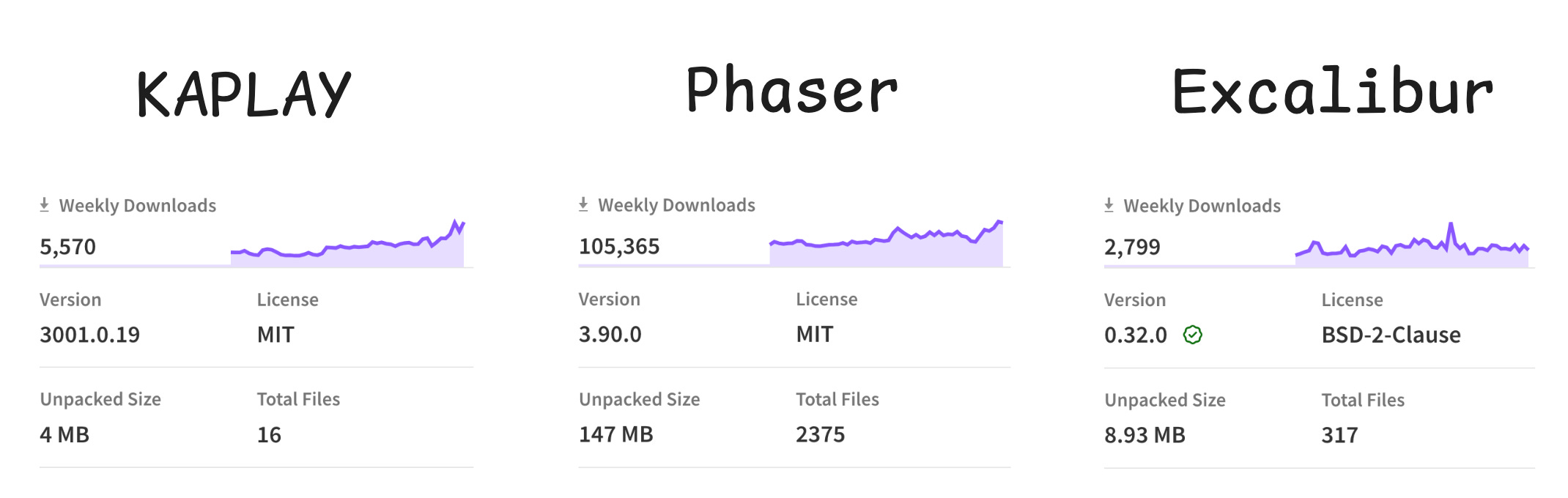
Below are links to playable demos along with the source code for each version of the game. I recommend browsing the code of each version to get a better feel of the differences between them.
KAPLAY version - (live demo) - (source code)
Phaser version - (live demo) - (source code)
Excalibur version - (live demo) - (source code)
Note that even though KAPLAY markets itself as a library and Excalibur as a game engine they still feel like frameworks and occupy the same space as Phaser. That’s why I took the liberty to refer to them as frameworks.
I will not beat around the bush. If you want stability and performance, you should pick Phaser. That said, overall, KAPLAY is the easiest one to learn but the least scalable of the 3. This makes it a good choice to get into game development as a beginner and to prototype ideas quickly but you’ll end up facing performance issues eventually. I’d like to note that there have been recent performance improvements. However, KAPLAY’s performance still doesn’t come anywhere close to the one offered by Phaser.
Additionally, Phaser has an AI advantage. For example, if you ask ChatGPT a question related to Phaser, more likely than not, the answer provided will be right. As for KAPLAY and Excalibur, you’ll get a lot more hallucinations. This AI advantage lowers the barrier of learning for Phaser which, in contrast, makes the easiness of KAPLAY less compelling.
While Phaser’s API is verbose, you get over it especially when you get performance and stability in exchange. Finally, Phaser is significantly more popular than the other 2 which means it will be easier to find help when needed.
If you’re looking to target mobile, Phaser is also your best bet between the 3 as the performance on Safari is also quite good and the best. This is relevant because Safari uses the Webkit web engine which is what’s forced on every browser and webview on iOS.
Finally, for multiplayer games, Phaser offers the ability to run it on the server in headless mode. This makes it much easier to handle state in a multiplayer game. To my knowledge, neither KAPLAY nor Excalibur offers something like this.
Should You Still Use KAPLAY?
As mentioned previously, KAPLAY might still be worth using in the context of prototyping or for game jams, as its component based approach allows you to truly iterate quickly on game design. Its simplicity also makes it an ideal candidate for teaching game development to beginners. Some have used it to teach children.
Should You Stil Use Excalibur?
Phaser and Excalibur felt very similar when using them as they both relied on the object oriented paradigm. Yet, I felt that Excalibur sometimes required more work. A notable example of this is when coming back to a scene after having switched away from it. The state of that scene would be left as is before transitioning over. This meant you had to write extra logic to reset the scene’s state, something you didn’t have to do in Phaser.
That said, I still felt that Excalibur’s API was on average a bit more concise than Phaser’s.
In conclusion, the issue with Excalibur is that it didn’t feel different enough from Phaser to warrant switching over to it, considering Phaser is more performant, more featureful, and more popular.
At the same time, I was impressed with how Excalibur handled its debug mode. Instead of having it within the framework, it was instead available as a browser extension. Debug mode would therefore appear in the browser devtools and could be toggled and configured from there. It was a nice experience.
GemShell
Regardless of the web framework you end up using, if you want to bring your web game to Steam, the easiest tool for achieving this is GemShell.
It allows you to create executables for Windows, Mac and Linux in what amounts to a single click. It also offers an integration with Steam so you can easily have access to features like Steam achievements and now also the Steam overlay. (The latter might not be available yet at the time of publishing this post.)
(Video by the developer showcasing the use of Steam overlay on top of a game packaged with GemShell)
This tool will save you hours that would have been wasted configuring tools like Electron and Steamworks.js. Time which could have been spent working on your game instead.
To have a consistent experience across operating systems, GemShell now makes each executable Chromium based so that your game renders the same way on all platforms.
Additionally, The developer is also considering implementing the ability to export for mobile platforms as well.
Due to how useful this tool is, I have decided to partner with its developer to offer you a 15% discount if you use the following link : https://l0om.itch.io/jslegend
To be completely transparent, if you end up purchasing GemShell using the link above, I’ll get a cut of that sale. That said, a free lite version is available, if you want to get a feel for the tool.
I hope you enjoyed this post, I recommend subscribing to not miss out on future releases.
In the meantime, you can read the following :


GemShell being able to export to native mobile apps would be awesome!